From website chat to booked meeting, automatically

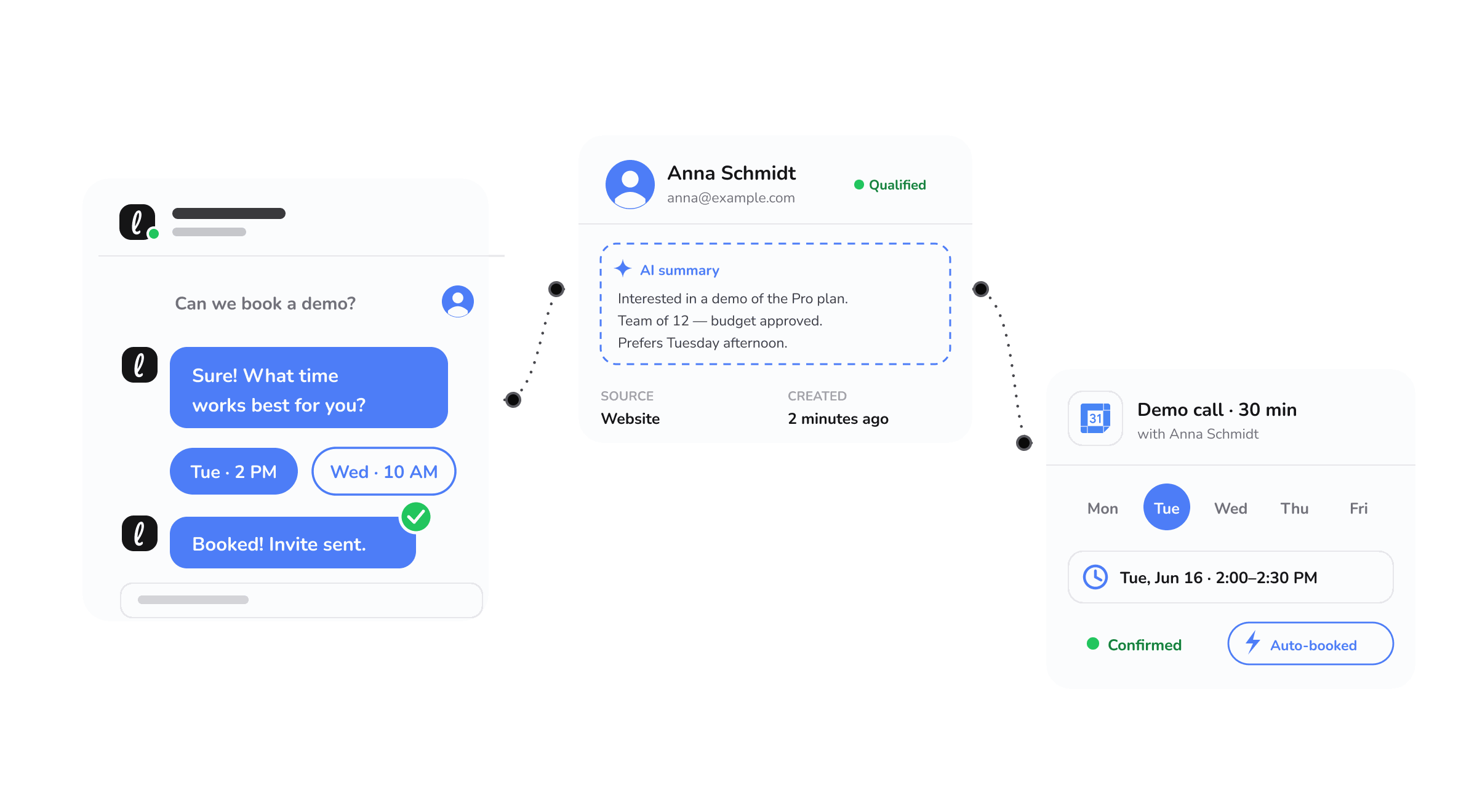
There is a very specific moment where deals are won or lost: a visitor is interested enough to want a conversation, right now. If the next step is "fill in this form and we will get back to you," you have taken a warm, ready buyer and asked them to wait. A meaningful share of them will not.
Booking a meeting is one of the three jobs the Leezy.ai agent is built to do, alongside answering questions and qualifying leads. The agent can now book meetings directly into your connected Google or Outlook calendar. When someone is ready to talk, the agent finds a time that works, confirms it, and puts it on the calendar, inside the same conversation.
Why the booking step is where things break
Most businesses handle scheduling as a relay. The visitor asks to talk, someone replies to suggest times, the visitor picks one, someone sends an invite. Every step is a chance for the thread to stall, and every hour of delay lets the visitor's attention move on.
Even a dedicated scheduling link, which is better than a form, still asks the visitor to leave the conversation, open a new page, and figure out the tool. Each extra step sheds a few people. The visitors you lose this way are not the uninterested ones. They are the ones who were interested enough to ask and then hit friction.
Letting the agent book the meeting inside the conversation removes that friction entirely. The person never leaves the chat. They say they want to talk, the agent handles the scheduling, and it is done.
What the agent does
When a conversation reaches the point where a meeting makes sense, the agent can:
- Offer real availability from your connected calendar, so it never proposes a time you are not actually free.
- Confirm the booking with the visitor and write the event to your Google or Outlook calendar.
- Capture the context of the conversation alongside the meeting, so whoever takes the call knows what it is about before it starts.
It works with the calendar your team already runs on. You are not adding a scheduling product to your stack or asking anyone to change how they manage their day. The meetings simply appear where your team already looks.
What a business gets out of it
More conversations become meetings. The tighter the path from interest to booked time, the more of your interested visitors actually make it onto the calendar. Removing steps is the most reliable way to lift conversion at this stage.
Meetings booked around the clock. A visitor at 10pm can book a meeting for next week without waiting for your office to open. You capture intent whenever it appears, not only during business hours.
Better prepared calls. Because the conversation that led to the booking travels with it, the person taking the meeting starts informed instead of cold. That makes the meeting itself more productive.
Less scheduling overhead. Nobody plays email tag to find a time. The back and forth that eats a surprising amount of a team's week simply goes away.
Keeping it accurate
Automated scheduling is only trustworthy if it never double books and never offers a slot you cannot make. That is why the agent works from your real, connected calendar rather than a static list of times. Availability reflects what is actually open, and confirmed meetings are written straight to the calendar so everyone is working from the same source of truth.
This pairs naturally with lead qualification. The sales agent is designed to understand who it is talking to before it offers a meeting, so the calls that get booked are the ones worth having. Answering, qualifying, and booking are meant to work as one motion, not three disconnected features.
Setting it up
You connect your Google or Outlook calendar in the dashboard, tell the agent when it is allowed to book, and it takes care of the rest. There is no scheduling tool to configure separately. The documentation covers connecting a calendar and setting your booking rules, and the integrations page shows calendar booking alongside the other tools your agent works with.
Frequently asked questions
Which calendars are supported? Google and Outlook calendars. The agent books directly into the calendar your team already uses.
Can it double book me? No. The agent offers availability from your connected calendar, so it only proposes times you are actually free, and writes confirmed meetings back to the same calendar.
Do I control when it can book? Yes. You set the rules for when the agent is allowed to book, so it only offers times that fit how you work.
Does the person taking the call see the conversation? The context of the conversation is captured with the meeting, so whoever takes the call can see what it is about beforehand.
If your current booking flow involves a form and a wait, the fastest win available to you is letting the agent close that gap. You can start free, no credit card required, connect your calendar, and turn interested visitors into confirmed meetings inside a single conversation.