AI agent on WhatsApp: answer customers where they already are

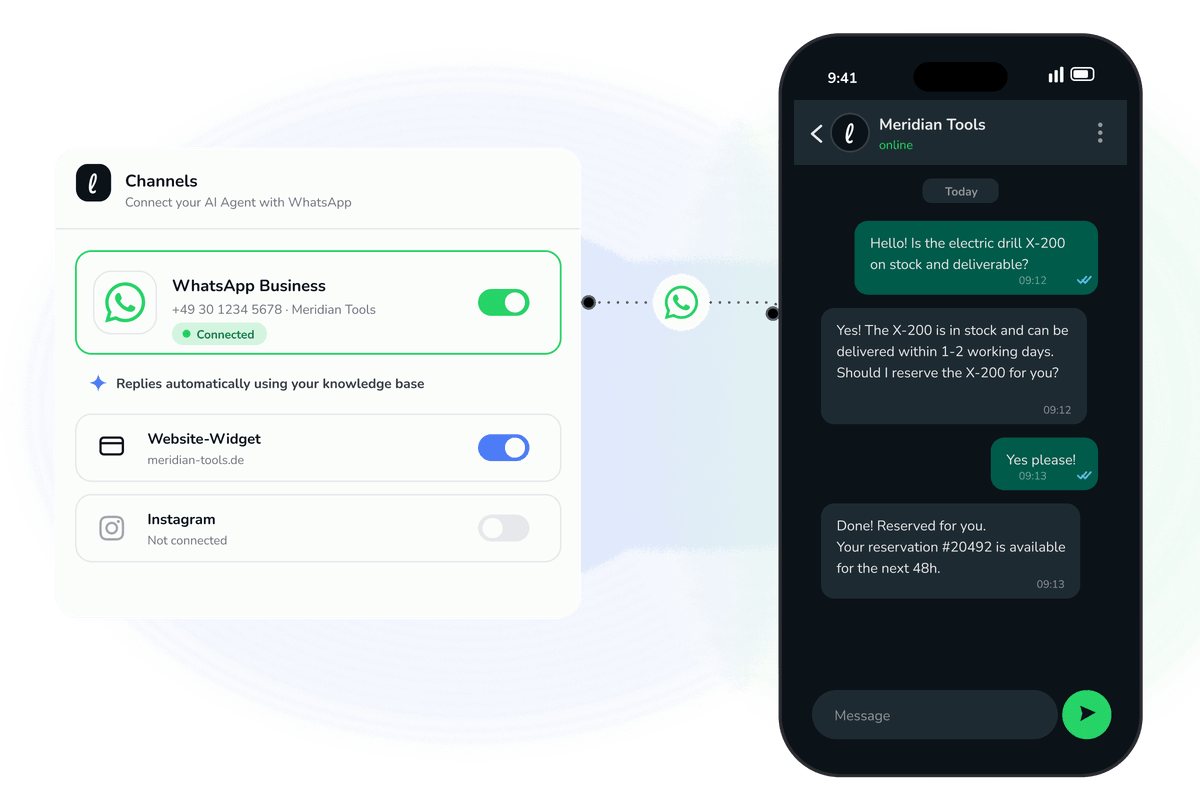
Most of the teams we work with at hypescale already have a WhatsApp Business number on their website. Very few of them can keep up with it. Messages arrive in the evening, on weekends, and in the middle of a busy shift, and the person who owns the inbox is rarely free to reply within a few minutes. That gap between "customer sends a message" and "someone answers" is where trust quietly leaks away.
Today your Leezy.ai AI agent answers on WhatsApp directly. The same agent you train on your own content can now hold a full conversation on the channel your customers already use, at any hour, in their own language.
Why WhatsApp is worth doing properly
WhatsApp is not a novelty channel. For a large share of buyers it is the default way to reach a business. When someone messages you there, they expect the same thing they expect from a friend: a fast, relevant reply. A slow or generic response feels worse on WhatsApp than it does by email, because the medium itself promises immediacy.
The problem is that staffing WhatsApp like a live channel is expensive. You either pay people to watch it or you let it drift, and a drifting WhatsApp inbox trains customers to stop asking. An AI agent changes the economics. It answers the first message instantly, handles the routine questions on its own, and only pulls a human in when the conversation genuinely needs one.
What the agent actually does on WhatsApp
The agent is grounded in your own content. You connect your website, upload your documents, and it learns how your business answers questions. On WhatsApp that means it can:
- Answer product, pricing, availability, and policy questions using your real information rather than guesses.
- Capture a lead when someone is clearly interested, so the contact and the context land with your team instead of disappearing into a thread nobody reads.
- Hand off to a person when the question is sensitive, unusual, or explicitly asks for a human, without pretending the handoff did not happen.
- Reply in the customer's language, so you are not limited to the languages your team happens to speak.
Because it runs on the WhatsApp Business platform, it works with the number your customers already know. You are not asking anyone to install anything or learn a new tool. They message you the way they always have, and someone, or something, competent answers.
What a business gets out of it
The point of putting an agent on WhatsApp is not "we have AI now." It is a set of concrete outcomes:
Faster first response. The single biggest driver of a good support experience is how long the customer waits for the first useful reply. An agent answers in seconds, at 2pm and at 2am, which removes the after-hours dead zone entirely.
Fewer repetitive questions reaching your team. A predictable share of WhatsApp messages are the same handful of questions: opening hours, whether you carry a product, how returns work, where an order is. When the agent handles those, your team spends its time on the conversations that actually need judgment.
Leads you would otherwise miss. A customer who asks a buying question on WhatsApp at 9pm is a warm lead. If nobody replies until the next morning, that intent has cooled. The agent captures the lead in the moment and passes it on with the full conversation attached.
A channel you can finally staff. Many teams keep WhatsApp switched off, or buried, because they cannot commit to answering it. With an agent covering the first line, WhatsApp becomes a channel you can promote on your site with confidence.
Keeping control of quality
Automating a personal channel makes people nervous, and it should. An agent that confidently invents an answer is worse than no agent at all. Two design choices matter here.
First, the agent answers from your content, not from the open internet. If your documents say returns take fourteen days, that is what it tells people. Grounding the answers in your own material is what keeps them accurate.
Second, escalation is visible, not hidden. When a conversation needs a human, the handoff is explicit and the context travels with it. The customer is never left talking to a wall, and your team is never handed a conversation with no history. Automating support should never mean hiding the way out of automation. You can read more about that principle on the customer support agent page.
How to set it up
Connecting WhatsApp is a configuration step, not a development project. In the dashboard you connect your WhatsApp Business account, point the agent at the chatbot you have already trained, and go live. Because the setup involves the Meta WhatsApp Business platform, we wrote a full walkthrough in the documentation so you can follow each screen without guessing.
If you have not built your agent yet, start there first. Train it on your website and documents, confirm it answers your common questions well in the playground, and only then connect WhatsApp. The channel is only as good as the agent behind it.
Frequently asked questions
Do I need a separate WhatsApp number for the agent? No. The agent works with your existing WhatsApp Business number, so customers keep messaging the number they already know.
What happens when the agent cannot answer? It hands the conversation to a person and passes along the context. Escalation is treated as a normal, visible part of the flow rather than a failure to hide.
Can it answer in more than one language? Yes. The agent replies in the customer's language, which is useful on WhatsApp where you often cannot predict who will message you.
Will it make things up? The agent answers from the content you train it on. Grounding responses in your own material is the mechanism that keeps answers accurate, and clear escalation covers the cases it should not attempt.
Putting your AI agent on WhatsApp is one of the fastest ways to turn a channel you were quietly ignoring into one that answers customers instantly and captures the leads hiding in it. You can start free, no credit card required, train the agent on your own content, and connect WhatsApp when it is answering the way you want.